Wallet
Postage is paid from your EasyPost wallet: when you buy a label, its cost comes out of your wallet balance, so keep enough funds in it to cover your shipping. Click Wallet at the top of the full-page app, or in the drawer’s footer menu, to open Manage wallet:
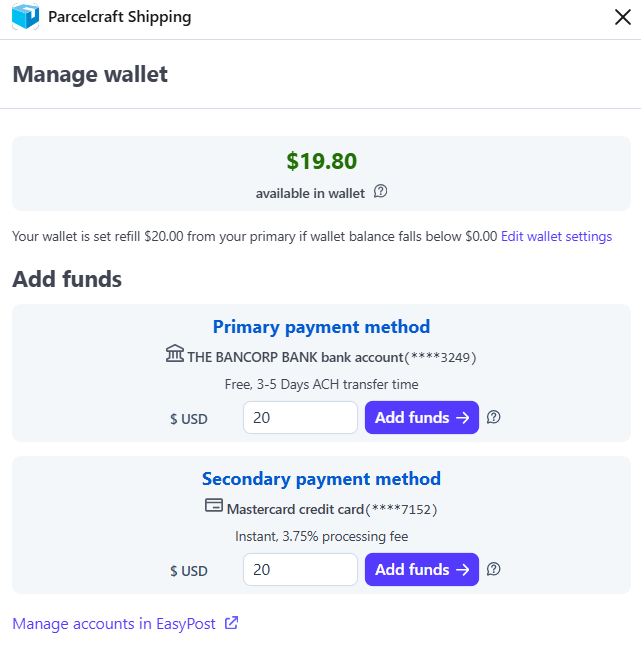
We recommend keeping about a week’s worth of your average shipping costs in the wallet, so free ACH transfers have time to clear before the balance runs out.
Add funds
Funds come from the payment methods on your EasyPost account — a primary and an optional secondary. The two kinds of payment method behave differently:
| Payment method | Speed | Fee |
|---|---|---|
| Bank account (ACH) | 3–5 days | Free |
| Credit card | Instant | 3.75% processing fee |
Enter an amount next to the payment method ($20.00 minimum), click Add funds, and confirm.
Payment methods themselves are managed in EasyPost, not in Parcelcraft. Click Manage accounts in EasyPost at the bottom of the view to add or change them.
Auto-refill
The sentence under your balance shows your current auto-refill rule — for example, refill $20.00 from your primary payment method when the balance falls below $0.00. Click Edit wallet settings to change it:
- Auto reload amount — how much to add from your primary and, optionally, your secondary payment method when a refill triggers.
- Trigger when balance is below — the balance that triggers a refill. Set the trigger to $0 if you don’t want automatic refills.
Click Confirm to save.
The wallet requires a production EasyPost API key. Test labels don’t cost postage, so no funds are needed while you experiment in Stripe test mode.